Key Takeaways
- Computer bus architecture is the foundational communication system linking a computer’s components, vital for overall performance.
- Modern systems leverage high-speed buses like PCI Express (PCIe) for graphics and fast storage, a significant leap from older standards.
- A 32-bit address bus can address up to 4 gigabytes of memory, according to Patsnap Eureka (2025).
- A 64-bit data bus can move 64 bits of data in a single clock cycle, according to the YouTube channel CodeLucky (2026).
- Understanding bus architecture helps explain why some hardware upgrades dramatically improve PC speed.
Have you ever wondered what makes your computer’s different parts talk to each other, or why upgrading your graphics card can make such a difference? The answer lies deep within the intricate design of your system’s digital highways, and understanding your computer bus architecture explained is key to unlocking that knowledge. It’s the unseen framework that dictates how quickly and efficiently your CPU, RAM, storage, and peripherals communicate, fundamentally impacting your computing experience. This article will provide a clear, detailed computer bus architecture explained guide.
Quick Answer: Computer bus architecture is the digital highway enabling data transfer between components like the CPU and RAM. It uses data, address, and control buses to manage information flow, crucial for overall system performance. This essential computer bus architecture explained guide covers its types, function, evolution, and impact.
What is Computer Bus Architecture?
Computer bus architecture is the fundamental communication pathway that connects various internal components of a computer system, facilitating the transfer of data, addresses, and control signals between them. Think of it as the nervous system of your PC, carrying vital information between the “brain” (CPU) and other “organs” like memory and storage. A well-designed computer bus architecture explained ensures seamless operation and optimal performance for all connected hardware.
A bus, in computing and digital technology, is an electronic pathway through which data can be transferred. The system bus is a fundamental component of computer architecture, impacting the performance, scalability, and efficiency of computing systems. Understanding the computer bus architecture explained helps demystify how your computer processes information.
This complex network allows components to send and receive information, whether it’s the CPU requesting data from RAM, a graphics card (like those from NVIDIA) sending processed images to the display, or an external drive communicating via USB. Without a robust computer bus architecture explained, your system would grind to a halt. The primary goal of any computer bus architecture explained is to efficiently manage these critical data flows.
Key Insight: The efficiency of your computer is directly tied to how well its bus architecture manages data traffic. A bottleneck in the computer bus architecture explained can severely limit the potential of even the most powerful CPU or GPU.
The system bus is a fundamental component of computer architecture, impacting the performance, scalability, and efficiency of computing systems. This system bus definition is central to grasping the core concept. The computer bus architecture explained is built upon these pathways.
Here’s a quotable fact about the importance of system buses:
The system bus is the backbone of computer communication, enabling every component to interact and function as a cohesive unit. Its design dictates how quickly information moves, directly affecting user experience.
In essence, a clear computer bus architecture explained is crucial for understanding hardware interaction. The way data moves is governed by the computer bus architecture explained.
The Three Main Types of Computer Buses (Data, Address, Control)
To truly grasp computer bus architecture explained, it’s essential to understand its three primary components: the data bus, the address bus, and the control bus. Each plays a distinct yet complementary role in the overall communication process, making a comprehensive computer bus architecture explained vital for system functionality.
The data bus is responsible for carrying the actual data being transferred between components. Think of it as the highway lanes where information travels back and forth. A 64-bit data bus can move 64 bits of data in a single clock cycle, according to the YouTube channel CodeLucky (2026), showcasing its capacity. This is a critical aspect of any computer bus architecture explained.
Next, the address bus specifies the location of the data or instruction in memory or on an I/O device. It’s like a postal worker delivering mail to a specific house number. A 32-bit address bus can address up to 4 gigabytes of memory, according to Patsnap Eureka (2025). Understanding the address bus is fundamental to a complete computer bus architecture explained.
Finally, the control bus carries command and status signals from the control unit to other components, coordinating their activities. It dictates when data can be sent, when it’s read, and what operations are being performed. This makes the control bus function indispensable for managing the flow dictated by the computer bus architecture explained.
Here’s a breakdown of their roles:
- Data Bus: Carries the actual data being processed or transferred between components. Its width directly impacts how much data can be moved at once.
- Address Bus: Specifies the memory location or I/O port that the CPU wants to access. Its width determines the maximum amount of memory the system can address.
- Control Bus: Transmits control and timing signals to synchronize operations and manage the flow of information across the system bus.
The intricate interplay of these three buses forms the core of any computer bus architecture explained. Without them, the CPU wouldn’t know where to find data or how to send results. This detailed computer bus architecture explained highlights their importance.
The data, address, and control buses work in concert, like different departments in a company, each with a specific job ensuring smooth and organized operations.
Mastering the computer bus architecture explained requires understanding these distinct pathways.
How Does Computer Bus Architecture Work?
The operation of computer bus architecture explained is a synchronized dance of electrical signals governed by the CPU and the motherboard’s chipset. When the CPU needs to access data, it first uses the address bus to send out the specific memory location it requires. This is a core principle in how computer buses work.
Once the address is sent, the CPU then uses the data bus to either read the requested information from that location or write new data to it. This entire process is orchestrated by signals on the control bus, which tells components when to listen, when to transmit, and what type of operation is occurring. A proper computer bus architecture explained ensures these signals are perfectly timed.
For instance, when you launch an application, the CPU sends the address of the program’s executable file on your storage drive (like an SSD connected via SATA) through the address bus. The storage controller then retrieves the data blocks and sends them back over the data bus to the RAM, and then potentially to the CPU for execution. This entire sequence is managed by the computer bus architecture explained.
Here’s a simplified view of the process:
- CPU Request: The CPU determines it needs data or wants to send data.
- Address Transmission: The CPU places the memory address or I/O port number onto the address bus.
- Control Signals: The CPU sends signals via the control bus indicating whether it’s a read or write operation.
- Data Transfer: The component at the specified address responds. If it’s a read, it places the data onto the data bus for the CPU to fetch. If it’s a write, the CPU places the data onto the data bus for the target component to receive.
This continuous cycle is how every piece of data moves within your system, making the computer bus architecture explained fundamental to its operation. The speed and efficiency of this cycle directly influence overall system responsiveness. This computer bus architecture explained provides the foundational understanding.
The bus system acts like a traffic controller for digital information, directing data to the right place at the right time.
Understanding how computer buses work is key to appreciating the complexity behind a smooth user experience, especially when discussing computer bus architecture explained.
The Evolution of Bus Architectures: From ISA to PCIe
The journey of computer bus architecture is a fascinating story of increasing speed and efficiency, evolving from slow, narrow pathways to the high-bandwidth marvels we use today. Early personal computers relied on relatively simple bus systems, but advancements in processing power demanded more capable communication channels. This evolution is a critical part of any computer bus architecture explained.
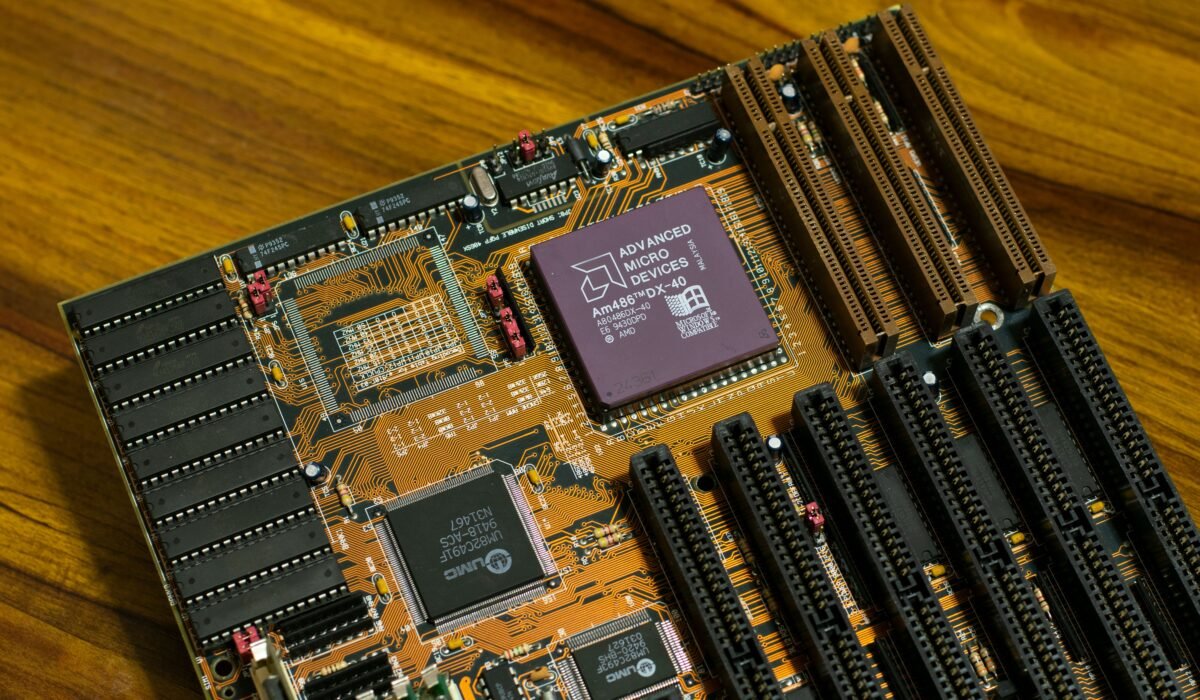
The Industry Standard Architecture (ISA) bus, introduced in the early 1980s, was one of the first widely adopted standards. The ISA bus ran at a clock speed of 4.77 MHz, according to BITT Polytechnic (n.d.), and was later enhanced with the AT bus running at 8MHz, according to BITT Polytechnic (n.d.). While foundational, it was incredibly slow by modern standards, limiting the performance of add-on cards and peripherals. This historical context is vital for a complete computer bus architecture explained.
As technology progressed, buses like PCI (Peripheral Component Interconnect) emerged, offering higher speeds and a more sophisticated design than ISA. Intel played a significant role in developing PCI, aiming to overcome the limitations of earlier architectures. PCI allowed for plug-and-play functionality and significantly increased bandwidth, making it a staple for many years.
The most significant leap forward in recent decades has been PCI Express (PCIe). Unlike older parallel buses, PCIe is a serial interface that uses point-to-point connections, offering vastly superior bandwidth and lower latency. Modern graphics cards from NVIDIA and AMD, for instance, rely heavily on PCIe for high-speed data transfer to and from the CPU and RAM. This shows how the computer bus architecture explained has become critical for high-performance components.
Here’s a look at key evolutionary milestones:
- ISA (Industry Standard Architecture): Early standard, slow speeds (4.77 MHz), limited bandwidth.
- EISA (Extended ISA): An attempt to improve ISA with wider data paths and higher speeds.
- PCI (Peripheral Component Interconnect): Introduced higher speeds, plug-and-play, and a more efficient architecture.
- AGP (Accelerated Graphics Port): A dedicated bus for graphics cards, offering improvements over PCI for its specific purpose.
- PCI Express (PCIe): Modern, high-speed serial interface using lanes for dedicated point-to-point connections, offering massive bandwidth.
The transition from ISA to PCIe exemplifies how crucial innovation in bus technology is for overall system capability. This evolution is a cornerstone of the computer bus architecture explained.
Each generation of bus architecture has been driven by the need to keep pace with ever-increasing processor speeds and data demands.
Understanding this historical progression provides valuable context for the current state of computer bus architecture explained.
How Bus Width Affects Computer Performance
One of the most impactful factors in computer bus architecture explained is its “width”—referring to the number of parallel pathways available for data transfer. This width directly dictates how much data can be transmitted simultaneously, acting as a critical bottleneck or enabler for system performance. A wider bus means more data can flow per clock cycle, leading to faster operations.
For example, a 32-bit data bus can transfer 32 bits of data in one go, while a 64-bit data bus can transfer twice that amount. This difference is profound for tasks involving large datasets, such as video editing, scientific simulations, or loading complex game environments. A wider bus allows for more data to be moved between the CPU and RAM, or between components like a graphics card and system memory, significantly reducing wait times. This is a central concept in computer bus architecture explained.
Similarly, the address bus width determines the system’s memory addressing capability. A 32-bit address bus can reference up to 4 gigabytes of RAM, a limit that was common for many years. However, modern computers often feature 64-bit processors, meaning their address bus is 64 wires wide, allowing for access to an immense number of memory locations, according to a YouTube video on processor architecture (2018). This massive increase in addressable memory is a direct result of wider address buses.
Consider the impact on performance:
Narrow Bus:
- Limited data throughput.
- Can create bottlenecks, slowing down faster components.
- Restricts the amount of memory a system can utilize (address bus).
Wide Bus:
- Higher data throughput, enabling faster transfers.
- Allows components to operate closer to their maximum potential.
- Supports larger amounts of RAM (address bus).
The trend in computer bus architecture explained has consistently been towards wider buses and higher clock speeds to feed the insatiable appetite of modern applications and processors. This understanding of bus width is crucial for anyone wanting a thorough computer bus architecture explained.
Bus width is analogous to the number of lanes on a highway; more lanes mean more traffic can flow unimpeded, leading to quicker travel times.
This principle is a cornerstone of effective computer bus architecture explained, influencing everything from boot times to application loading speeds.
Understanding Modern Bus Architectures (PCIe, USB, SATA)
Today’s computing landscape is dominated by highly efficient and versatile bus architectures designed for speed and connectivity. While the core principles of data, address, and control buses remain, modern implementations like PCI Express (PCIe), Universal Serial Bus (USB), and SATA have revolutionized how components communicate. Understanding these is key to a complete computer bus architecture explained.
PCI Express (PCIe): This is the ubiquitous standard for high-speed internal expansion cards. Found in everything from graphics cards from NVIDIA and AMD to high-speed network adapters and NVMe SSDs, PCIe offers exceptional bandwidth and low latency. It uses a lane-based system, where a PCIe x16 slot (commonly used for GPUs) has 16 dedicated lanes for data transfer, providing immense throughput. The speed of PCIe versions has increased dramatically, with PCIe 5.0 and 6.0 offering double the bandwidth of their predecessors.
Universal Serial Bus (USB): USB has become the de facto standard for connecting external peripherals. Its versatility, ease of use, and continually increasing speeds have made it indispensable. From USB 2.0 (480 Mbps) to USB 3.2 (up to 20 Gbps) and the latest USB4, each iteration represents a significant improvement in bus speed and capability. Devices like keyboards, mice, external hard drives, and even high-resolution webcams rely on USB.
SATA (Serial ATA): SATA is the primary interface for connecting storage devices like traditional Hard Disk Drives (HDDs) and Solid State Drives (SSDs) to the motherboard. While newer NVMe drives (which often use PCIe) are faster, SATA remains prevalent due to its cost-effectiveness and sufficient speed for many applications. SATA III, for example, offers speeds up to 6 Gbps, which is ample for most consumer-grade SSDs.
Here’s a quick comparison of their roles:
| Bus Architecture | Primary Use Case | Key Characteristic | Typical Speeds (Approx.) |
|---|---|---|---|
| PCI Express (PCIe) | High-speed internal expansion (GPUs, NVMe SSDs) | Dedicated, high-bandwidth serial lanes | PCIe 4.0 x16: ~32 GB/s |
| Universal Serial Bus (USB) | External peripheral connection (keyboards, drives, cameras) | Versatile, hot-pluggable, standardized | USB 3.2 Gen 2×2: 20 Gbps |
| SATA (Serial ATA) | Internal storage connection (HDDs, SSDs) | Cost-effective, reliable for storage | SATA III: 6 Gbps |
These modern bus architectures are the engines driving the performance and connectivity of our computers. A solid grasp of the computer bus architecture explained, including these contemporary standards, is essential for anyone interested in computer hardware. This entire article serves as a comprehensive computer bus architecture explained guide.
Expert Insight: The continuous innovation in bus architectures, from Intel’s early contributions to modern PCIe standards, directly translates to more powerful and responsive computing experiences for users.
Frequently Asked Questions
What is a computer bus and its types?
A computer bus is a communication system that transfers data between components inside a computer or between computers. The three main types are the data bus (carries data), the address bus (specifies location), and the control bus (manages operations). This forms the core of the computer bus architecture explained.
What are the three main buses in a computer?
The three main buses are the data bus, which carries the actual information being transferred; the address bus, which indicates where that information is located in memory; and the control bus, which manages the flow and timing of operations. Understanding these is vital for a computer bus architecture explained.
What is the function of the data bus?
The data bus’s function is to carry the actual data being sent between the CPU, memory, and other peripherals. Its width, measured in bits, determines how much data can be transferred simultaneously, significantly impacting system speed. A 64-bit data bus can move 64 bits of data in a single clock cycle, according to the YouTube channel CodeLucky (2026).
What is the function of the address bus?
The address bus specifies the physical location in memory or on an I/O device that the CPU intends to access. Its width limits the total amount of RAM the system can manage. A 32-bit address bus can address up to 4 gigabytes of memory, according to Patsnap Eureka (2025).
How does a computer bus work?
A computer bus works by using electrical pathways to transmit signals: the address bus sends location information, the data bus carries the actual information, and the control bus synchronizes these operations. This coordinated transfer ensures components can communicate effectively, forming the basis of any computer bus architecture explained.
In summary, understanding computer bus architecture explained is like knowing the road network of a city; it reveals how traffic flows and why certain routes are faster than others. From the fundamental data, address, and control buses to the lightning-fast PCIe, USB, and SATA interfaces, each component plays a crucial role in your computer’s performance. By appreciating the evolution and function of these digital highways, you gain deeper insight into your system’s capabilities and can make more informed decisions about hardware. Dive deeper into your system’s architecture to unlock its full potential.