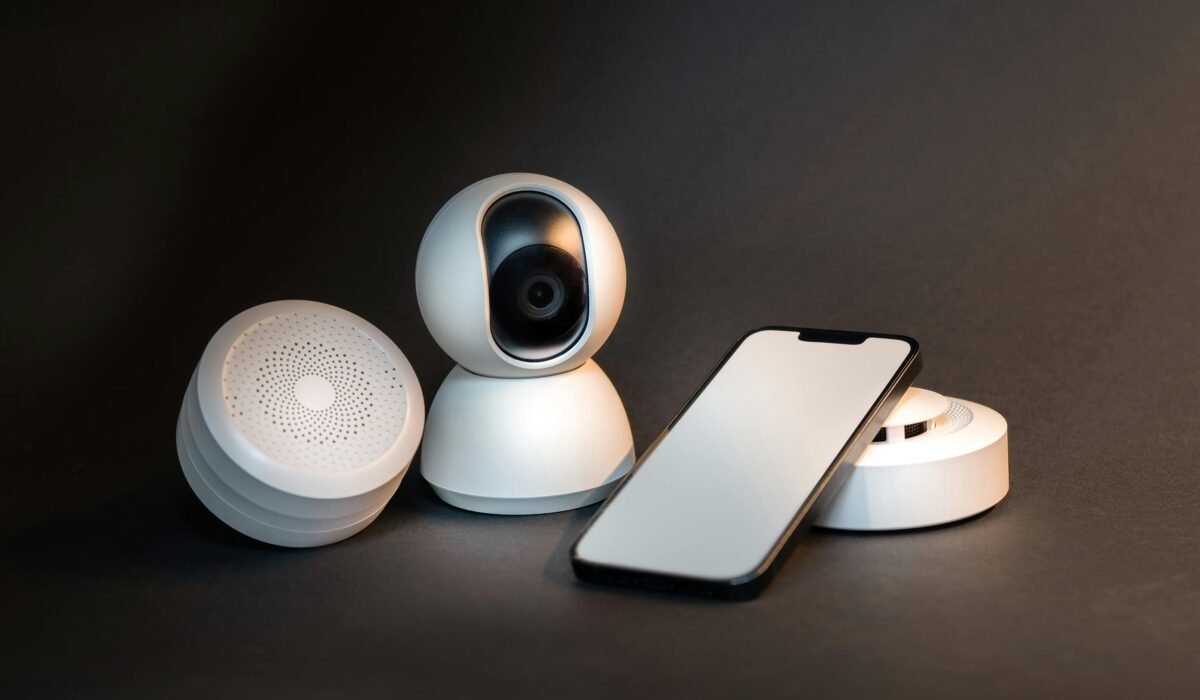
Feeling overwhelmed by the idea of transforming your home into a smart haven with artificial intelligence? You’re not alone. Many beginners wonder how to approach AI home automation for beginners without getting lost in technical jargon or breaking the bank. This guide will walk you through the simple steps to set up your own AI-powered smart home, making advanced technology accessible and easy to understand.
What is AI Home Automation for Beginners?
At its core, AI home automation for beginners refers to using artificial intelligence to make your home devices work together intelligently and often without direct input from you. Unlike basic smart homes that simply react to your commands, AI-powered systems learn your habits, anticipate your needs, and adjust settings proactively.
Think of it this way: a traditional smart light turns on when you say “Alexa, turn on the light.” An AI-automated light might turn on automatically when you walk into a room, adjusting brightness based on the time of day and your usual preferences. This functionality is enabled by IoT devices that communicate with a central hub, learning from your interactions.
The global AI in home automation market is experiencing rapid growth, projected to be worth around USD 238.3 billion by 2033, up from USD 20.5 billion in 2023, according to MarketsandMarkets. This expansion is driven by the desire for more personalized and predictive automation, as Marcus Thorne, Senior Systems Architect at Digitalholics, notes that modern AI systems “anticipate needs—adjusting lighting, climate, and security before you even ask.”
How Do I Start My AI Smart Home Journey?
Embarking on your AI smart home journey doesn’t have to be complicated; it’s about taking a “Crawl, Walk, Run” approach. The key is to start small, understand your immediate needs, and then gradually expand your system. Don’t feel pressured to automate your entire house overnight.
Begin by identifying a single area or problem you want to solve. Perhaps you want to save energy, enhance security, or simply enjoy the convenience of controlling lights with your voice. This focused approach makes the DIY smart home AI setup much less daunting.
For most people, the easiest entry point is a voice assistant like Amazon Echo (Alexa) or Google Nest Hub (Google Assistant). These devices act as central brains, allowing you to control compatible smart home devices with simple commands, and they’re incredibly user-friendly. Find your perfect match with our guide on the Best AI Voice Assistant for Smart Home?.
Essential Components for Your First AI Home Automation Setup
Building your first AI home automation system requires a few key elements. Understanding these foundational pieces will help you make informed decisions and ensure compatibility as you grow your smart home.
Smart Hub or Voice Assistant
This is the brain of your operation, connecting all your IoT devices and enabling them to communicate. While dedicated smart home hubs exist, popular voice assistants like Amazon Echo and Google Nest Hub often serve this role effectively for beginners. They provide a user-friendly interface for control and allow you to set up basic automations and routines. Apple HomePod Mini (Siri) is another excellent option for those in the Apple ecosystem.
Core Smart Devices
Once you have a central hub, you’ll need devices to automate. Here are some popular starter options:
- Smart Lighting: Dimmable bulbs or switches that you can control remotely or with your voice.
- Smart Thermostats: Devices like Google Nest Thermostat or Ecobee Premium learn your preferences and adjust temperatures for comfort and energy efficiency smart home benefits.
- Smart Plugs: Turn any traditional appliance (like a lamp or coffee maker) into a smart device, allowing you to control it remotely.
- Smart Locks: Enhance home security AI by allowing keyless entry and remote monitoring. Brands like Schlage offer great options.
Choosing devices that are compatible with your chosen voice assistant or hub is crucial for a seamless experience. Most products clearly state their compatibility with Alexa, Google Assistant, or Apple HomeKit.
Simple Steps to Set Up Your AI Home Automation System
Setting up your AI home automation system doesn’t require an engineering degree. Here’s a straightforward, step-by-step guide to get you started on your smart home journey.
- Define Your Needs & Budget: Before buying anything, decide what you want to automate first. Is it lighting, climate control, or security? This helps you prioritize and stick to your budget. Remember, you don’t need to automate everything at once.
- Choose Your Ecosystem: Decide if you’ll primarily use Amazon Alexa, Google Assistant, or Apple HomeKit. Your choice will influence which smart home devices you buy, as compatibility is key. Most devices work with at least two of these major platforms, but some are exclusive.
- Install Your Smart Hub/Voice Assistant: Plug in your Amazon Echo, Google Nest Hub, or other smart home hub. Download the corresponding app (Alexa app, Google Home app) and follow the on-screen instructions to connect it to your home Wi-Fi network. This usually involves a few taps and entering your Wi-Fi password.
- Add Your Devices: One by one, install your smart devices according to their individual instructions. This often involves plugging them in, opening the hub’s app, and selecting “Add Device.” The app will guide you through the pairing process, which might involve scanning a QR code or pressing a button on the device. This is where you’ll be connecting smart devices Alexa Google.
- Create Routines & Automations: This is where the “AI” truly shines. Use your hub’s app to create routines. For example, “When I say ‘Good Morning,’ turn on bedroom lights, start the coffee maker, and play the news.” Or, set up predictive automation like having your smart thermostats automatically adjust based on your daily schedule and local weather, learning your preferences over time.
The beauty of modern smart home systems is their user-friendly apps, which simplify even complex automations into intuitive drag-and-drop interfaces. Don’t be afraid to experiment with different routines to find what works best for your lifestyle.
Is AI Home Automation Expensive? Cost-Effective Entry Points
One of the biggest misconceptions about AI home automation is that it’s prohibitively expensive. The short answer is: it doesn’t have to be. While high-end systems can certainly cost a lot, there are many affordable AI home automation options for beginners.
Starting Small, Scaling Smart
You can begin with a single voice assistant speaker for under $50 and add a few smart bulbs or plugs for another $20-$30 each. This minimal investment allows you to experience the convenience without a huge financial commitment. The “Crawl, Walk, Run” approach means you can gradually add devices as your budget allows and as your needs evolve.
For example, a starter kit with a smart hub and a couple of lights can often be found for under $100. This makes AI home automation for beginners highly accessible. As you become more comfortable, you can expand to more complex systems like home security AI or advanced smart thermostats.
Maximizing Value
Beyond the initial cost, AI home automation offers tangible long-term value. Smart features can raise a home’s value by up to 10%, and they can also reduce utility bills by up to 20%, according to various studies. This means your smart home investment can actually pay for itself over time through energy savings and increased property value. For more on this, explore how AI Boosts Smart Home Energy Efficiency & Savings.
AI Home Automation Benefits: Beyond Convenience
While convenience is a major draw, the benefits of AI in smart home living extend far beyond simply controlling devices with your voice. AI transforms a collection of gadgets into a truly intelligent and responsive living environment.
One of the most significant advantages is energy efficiency smart home management. Devices like the Google Nest Thermostat and Ecobee Premium use AI to learn your patterns, analyze weather forecasts, and optimize heating and cooling, potentially saving you money on utility bills. Marcus Thorne from Digitalholics highlights how these systems use “local processing and mmWave presence sensing to anticipate needs.”
Home security AI is another area where AI makes a substantial impact. Advanced security systems like Arlo Pro 5S and Ring video doorbells use AI for object detection, facial recognition, and differentiating between people, animals, and vehicles. This reduces false alerts and allows for proactive responses, turning your home into a fortress. MarketsandMarkets analysis confirms that “AI is revolutionizing home security by making systems smarter and more proactive.” For a deeper dive, read our AI-Powered Smart Home Security: Beginner’s Guide.
Furthermore, AI enables truly predictive automation. Your lights might slowly brighten in the morning as you wake up, or your smart blinds could adjust based on the sun’s position to regulate indoor temperature. These AI smart home benefits create a living space that feels intuitively connected to your lifestyle, enhancing comfort and peace of mind.
Troubleshooting Common AI Smart Home Issues
Even with the simplest setup, you might encounter a few hiccups along the way. Here’s a quick guide to troubleshooting common AI home automation for beginners issues, so you can get back to enjoying your smart home.
Device Connectivity Problems
If a device isn’t responding, the first step is always to check its power supply. Ensure it’s plugged in and receiving power. Next, verify your Wi-Fi connection. A weak signal or temporary outage can disrupt communication between your IoT devices and your smart home hub. Try restarting your router and the problematic device.
Voice Assistant Misunderstandings
Sometimes your voice assistants might not understand your commands. Ensure you’re speaking clearly and that the device can hear you (check for background noise). Double-check the exact phrasing of your commands in the app; sometimes a slight variation can make a difference. Also, make sure the device you’re trying to control is correctly named and linked in your smart home app.
Routine or Automation Failures
If a routine isn’t executing as planned, go back into your smart home app and review the routine’s settings step-by-step. Check triggers (e.g., time of day, motion detection) and actions (e.g., turn on lights, adjust thermostat). Ensure all involved devices are online and working independently. Sometimes, a simple typo in a scheduled time can be the culprit.
Enhancing Privacy and Security in Your AI Home
As your home becomes smarter, protecting your data privacy smart home and security becomes increasingly important. While the convenience of AI is undeniable, it’s crucial to take proactive steps to safeguard your personal information and digital footprint.
Jenni Nelson, a leading technology analyst at Mintel, points out that “Gen AI implementation will drive innovation but will turn some tracking-averse consumers off.” This highlights the need for users to be vigilant. Here are actionable smart home privacy tips:
- Use Strong, Unique Passwords: This is foundational. Every smart device and app should have a complex, unique password. Consider using a password manager.
- Enable Two-Factor Authentication (2FA): Wherever available, enable 2FA for your smart home accounts. This adds an extra layer of security, requiring a second verification step (like a code from your phone) to log in.
- Understand Data Collection: Read the privacy policies of your smart home devices. Know what data they collect, how it’s used, and if it’s shared with third parties. Limit unnecessary data sharing in device settings.
- Secure Your Wi-Fi Network: Your smart home relies on your Wi-Fi. Use a strong, unique password for your router, and consider enabling WPA3 encryption if your router supports it. Regularly update your router’s firmware.
- Consider Local-First AI Solutions: Marcus Thorne emphasizes a “massive shift toward local-first AI hubs that keep sensitive footage and voice data off the cloud.” These systems process data on the device itself, reducing reliance on cloud servers and enhancing privacy.
- Regularly Update Firmware: Device manufacturers frequently release firmware updates to patch security vulnerabilities. Make sure your IoT devices and smart home hubs are always running the latest software.
By taking these steps, you can enjoy the full range of AI smart home benefits with greater peace of mind, knowing your personal data is better protected.
Frequently Asked Questions
What is AI home automation for beginners?
AI home automation for beginners involves using artificial intelligence to make your home devices work together intelligently and often without direct input from you. It moves beyond simple remote control to systems that learn your habits, anticipate needs, and proactively adjust settings like lighting or temperature.
How do I start with AI smart home?
To start your AI smart home journey, begin by choosing a clear goal, such as automating lights or climate control. A great entry point is a voice assistant like Amazon Echo or Google Nest Hub, which acts as a central control for compatible smart home devices. From there, you can gradually add more devices and create simple routines.
What are the basic components of AI home automation?
The basic components for AI home automation for beginners typically include a central smart hub or voice assistant (like Alexa or Google Assistant), and various IoT devices such as smart lights, smart thermostats, smart plugs, and security cameras. These devices communicate with the hub to enable automated routines and AI-powered learning.
Is AI home automation expensive?
No, AI home automation for beginners does not have to be expensive. You can start with affordable AI home automation options, such as a single voice assistant and a few smart plugs or bulbs, for under $100-$200. Systems are highly scalable, allowing you to add more devices and features as your budget and needs grow, making it a cost-effective choice in the long run.
Embracing AI home automation for beginners is a journey, not a destination. By starting with a clear purpose, choosing the right foundational components, and taking a “Crawl, Walk, Run” approach, you can create a smart home that truly enhances your daily life. Remember to prioritize privacy and security from day one to ensure your intelligent living space remains both convenient and safe. Your personalized, AI-powered home is just a few simple steps away.