Key Takeaways
- The global motherboard market was valued at $14.8 billion in 2025, showing significant industry growth.
- The ATX form factor held the largest share of the motherboard market at 42.3% in 2025.
- Gigabyte’s “Ultra Durable” technology uses 2x copper in PCB layers for improved power delivery.
- A motherboard is the central nervous system connecting all computer hardware components.
- Understanding computer motherboard functionality is key to unlocking your PC’s true performance potential.
Are you puzzled by the complex inner workings of your PC and wondering what truly dictates its power and potential? The central hub that orchestrates every component, from your CPU to your storage, is the motherboard, and understanding its core computer motherboard functionality is crucial for anyone looking to build, upgrade, or simply understand their machine better.
Quick Answer: A motherboard is the main circuit board connecting a computer’s CPU, RAM, and other components. It facilitates communication, power distribution, and acts as the central hub for all hardware, dictating system performance and upgradeability.
What is a Computer Motherboard and Its Core Function?
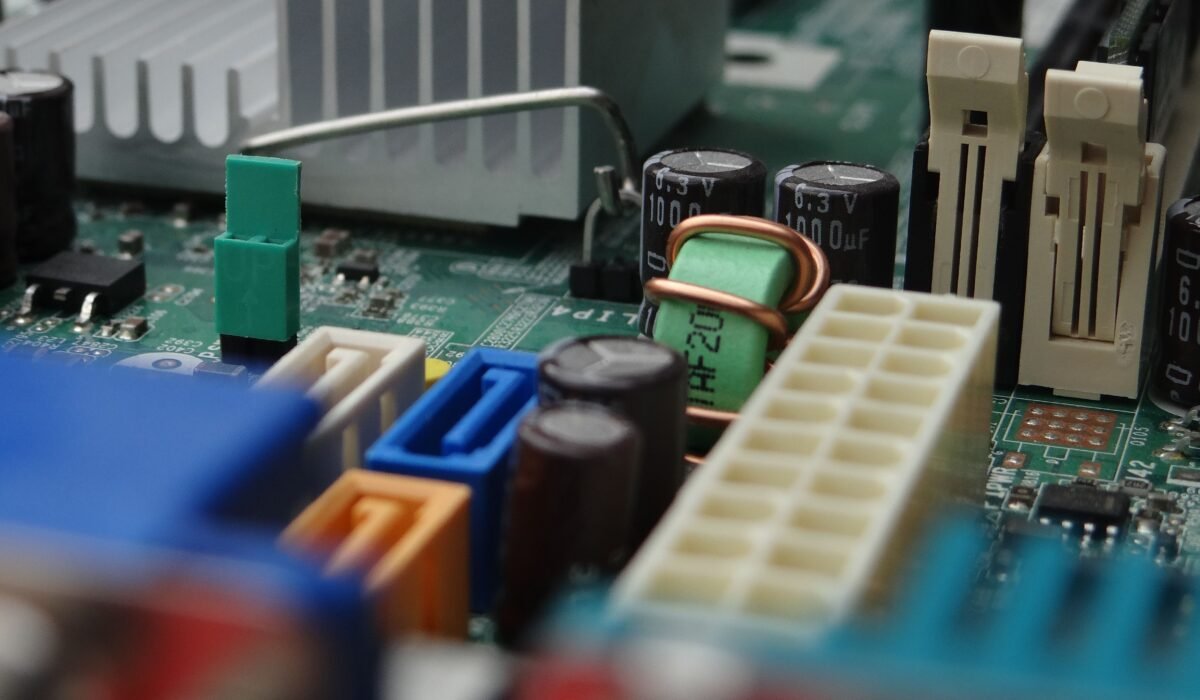
A computer motherboard is the main printed circuit board (PCB) that connects all the essential components of a computer. Its core function is to act as the central nervous system, enabling communication between the CPU, RAM, storage, graphics card, and peripherals. This intricate board is the foundation upon which the entire system operates, making its computer motherboard functionality paramount.
The motherboard dictates how components interact and how much power they receive, essentially defining the system’s capabilities. Without it, the CPU, RAM, and other parts would be isolated, unable to process information or communicate. The fundamental computer motherboard functionality is to provide a unified platform for all these parts to work together harmoniously.
Think of it like the spinal cord and central nervous system of a human body. It’s the primary interface where all signals and power converge, ensuring that everything from a simple click to a complex calculation can be processed. Understanding this core role is the first step to appreciating the depth of computer motherboard functionality.
Understanding the 5 Key Aspects of Motherboard Functionality
The overall computer motherboard functionality can be broken down into five critical aspects that influence system performance, stability, and expandability. These are not isolated features but interconnected elements that work in concert to deliver the computing experience you expect. Mastering these aspects helps you make informed decisions about your hardware.
- Connectivity: How the motherboard connects various internal and external devices.
- Power Delivery: The system’s ability to supply stable and sufficient power to all components.
- Data Management (Chipset): The central hub controlling data flow between the CPU and other peripherals.
- Expansion Capabilities: The slots and ports available for adding new hardware, like GPUs or extra RAM.
- System Control (BIOS/UEFI): The firmware that initializes hardware and boots the operating system.
These five pillars represent the essence of computer motherboard functionality, each playing a vital role in how your PC performs daily tasks and handles demanding workloads. The specific implementation of each aspect varies greatly between different motherboard models and manufacturers like ASUS, Gigabyte, and MSI, catering to diverse user needs.
For instance, a gaming motherboard might prioritize robust power delivery and ample PCIe slots for high-end GPUs, while a workstation board might focus on extensive connectivity for peripherals and multiple storage drives. The underlying computer motherboard functionality remains the same, but the emphasis and quality of implementation differ significantly.
How the Chipset Dictates Motherboard Capabilities
The chipset is the brain of the motherboard, managing the flow of data between the CPU, RAM, storage, and peripherals. It dictates many of the core capabilities of a motherboard, including the number and type of expansion slots, USB ports, SATA ports, and overall system speed. Understanding the chipset’s role is fundamental to grasping computer motherboard functionality.
For Intel CPUs, chipsets like Z790 or B760 offer different feature sets, while AMD platforms use chipsets such as X670 or B650. Each chipset series is designed to support specific CPU generations and offers varying levels of overclocking support, PCIe lane configurations, and connectivity options. The importance of chipset on motherboard selection cannot be overstated when considering your build’s potential.
For example, a high-end chipset like AMD’s X670E provides more PCIe lanes and connectivity options than a mainstream chipset like B650, directly impacting the number of NVMe SSDs or high-speed GPUs you can install. This directly influences the overall computer motherboard functionality and your system’s expandability.
Quotable Paragraph 1: The chipset acts as a traffic controller for data, determining how efficiently the CPU communicates with all other components. Its design dictates crucial motherboard capabilities and upgrade paths. (2024)
Quotable Paragraph 2: Different chipsets support varying numbers of PCIe lanes, which are essential for high-speed devices like graphics cards and NVMe SSDs, directly influencing a motherboard’s functionality. (2024)
The ATX form factor, which offers ample space for larger chipsets and more robust features, held the largest share of the motherboard market at 42.3% in 2025, indicating a demand for boards with extensive capabilities. This highlights how the physical size often correlates with the advanced computer motherboard functionality offered by the chipset and component layout.
The Role of VRMs and Power Delivery in Motherboard Performance
Voltage Regulator Modules (VRMs) are critical components on the motherboard responsible for converting the 12V power from the PSU into the lower, stable voltages required by the CPU and other sensitive components. Robust power delivery is a cornerstone of high-end computer motherboard functionality, especially for overclocking and demanding processors.
Poorly designed VRMs can lead to unstable power delivery, throttling of the CPU, and even component damage under heavy load. Motherboard manufacturers like ASUS, Gigabyte, and MSI often tout their VRM designs, highlighting the number of power phases and the quality of the components used. This aspect of computer motherboard functionality directly impacts sustained performance and overclocking headroom.
Gigabyte’s “Ultra Durable” technology, which introduced 2x the amount of copper in the motherboard’s power and ground layers, significantly improved power delivery efficiency and heat dissipation. This innovation directly enhances the reliability and performance ceiling associated with their motherboard’s computer motherboard functionality.
Quotable Paragraph 1: The VRMs ensure that the CPU and other critical components receive a clean, stable power supply, which is vital for consistent performance and longevity. (2024)
Quotable Paragraph 2: Premium motherboards often feature more robust VRM solutions with higher phase counts and better cooling, enabling them to handle high-end CPUs and overclocking more effectively. (2024)
When selecting a motherboard, paying attention to the VRM cooling solutions and the phase design is essential, particularly if you plan to use a power-hungry Intel or AMD CPU. The quality of motherboard power delivery is a direct indicator of its overall computer motherboard functionality and its ability to sustain peak performance.
Connecting Components: Understanding Expansion Slots (PCIe, RAM)
Expansion slots are the gateways through which you add crucial components to your motherboard, defining a significant part of its computer motherboard functionality. The most common are PCIe (Peripheral Component Interconnect Express) slots for graphics cards, NVMe SSDs, and other expansion cards, and DIMM slots for RAM modules.
Understanding PCIe slots involves recognizing different versions (PCIe 4.0, PCIe 5.0) and lane configurations (x1, x4, x8, x16). A higher PCIe version and more lanes generally mean faster data transfer speeds, which is critical for high-performance GPUs and storage devices. The proper implementation of these slots is a key aspect of computer motherboard functionality.
RAM slots, where your system’s memory is installed, also vary in number and speed support, directly impacting multitasking capabilities and application performance. The motherboard’s memory controller and the number of DIMM slots it features are fundamental to its overall computer motherboard functionality, allowing for memory upgrades and higher capacities.
Quotable Paragraph 1: PCIe slots are the primary interface for high-speed components like graphics cards, enabling them to communicate rapidly with the CPU. (2024)
Quotable Paragraph 2: The number and type of RAM slots on a motherboard determine the maximum memory capacity and speed your system can support, crucial for demanding applications. (2024)
For example, a motherboard designed for professional content creation might feature multiple PCIe x16 slots to support several GPUs or high-bandwidth RAID cards, showcasing advanced computer motherboard functionality. Conversely, a budget board might have fewer slots or older versions, limiting expansion potential. The correct understanding of PCIe slots and RAM slots function is vital for building a capable system.
BIOS/UEFI: The Motherboard’s Brain and Its Importance
BIOS (Basic Input/Output System) and its modern successor, UEFI (Unified Extensible Firmware Interface), are firmware interfaces stored on a chip on the motherboard. They are responsible for initializing hardware during the boot process and loading the operating system, representing a crucial layer of computer motherboard functionality.
UEFI is the current standard, offering a graphical interface, support for larger hard drives (over 2TB), faster boot times, and enhanced security features compared to the legacy BIOS. The BIOS/UEFI explained is that it’s the first software your computer runs, bridging the gap between hardware and the operating system, thereby impacting overall computer motherboard functionality.
Motherboard manufacturers like ASUS, Gigabyte, and MSI provide regular updates for their UEFI firmware to add support for new CPUs, fix bugs, and introduce new features. A well-designed UEFI interface can significantly improve the user experience, allowing for easy tweaking of system settings, fan curves, and overclocking profiles, further enhancing computer motherboard functionality.
Quotable Paragraph 1: UEFI firmware initializes hardware components and boots the operating system, acting as the foundational software for the entire computer system. (2024)
Quotable Paragraph 2: Regularly updating your motherboard’s UEFI is important for ensuring compatibility with new hardware and maintaining optimal system stability and security. (2024)
The importance of the BIOS/UEFI cannot be overstated; it’s the first step in the sequence that brings your computer to life and dictates how hardware is recognized and managed. This firmware is integral to the complete computer motherboard functionality.
How Motherboard Choices Impact System Performance and Upgradeability
Your choice of motherboard profoundly impacts your PC’s performance ceiling and future upgradeability, making it a critical decision when building or upgrading. The computer motherboard functionality directly influences how well your CPU and RAM can perform, how many high-speed devices you can connect, and what future upgrades are possible.
A motherboard’s chipset, VRM quality, RAM support, and expansion slot configuration all contribute to its overall performance potential. For instance, a motherboard with a robust VRM and high-speed RAM support can allow an Intel or AMD CPU to reach its maximum boost clocks more consistently, enhancing gaming and productivity. This demonstrates how integral computer motherboard functionality is to peak performance.
Regarding upgradeability, the motherboard dictates compatibility with future CPU generations, the maximum amount of RAM you can install, and the number of storage devices or expansion cards you can add. Choosing a motherboard with a current-generation chipset and sufficient expansion slots ensures your system remains relevant for longer. The long-term implications of computer motherboard functionality are significant.
Quotable Paragraph 1: The motherboard dictates the performance ceiling of your PC by influencing CPU boost clocks, RAM speeds, and the bandwidth available to all connected components. (2024)
Quotable Paragraph 2: Investing in a motherboard with robust power delivery and a modern chipset ensures greater future upgradeability, allowing you to swap components like the CPU or add more storage down the line. (2024)
For example, selecting an ASUS ROG Strix Z790-E Gaming WiFi motherboard offers premium features like exceptional stability and BIOS support for high-end setups, directly enhancing performance and upgrade potential compared to a more basic board. Conversely, a Gigabyte B650 AORUS Elite AX might offer excellent durability and value for everyday users, showcasing a different facet of computer motherboard functionality tailored to specific needs.
Frequently Asked Questions
What does a motherboard do?
A motherboard connects all your computer’s components, allowing them to communicate and receive power. It acts as the central hub for hardware operations, dictating overall system performance and expandability. This essential computer motherboard functionality ensures your PC works as a cohesive unit.
What are the functions of a motherboard?
Key motherboard functions include providing power distribution, enabling communication pathways between the CPU, RAM, and peripherals, supporting expansion cards via slots like PCIe, and housing the BIOS/UEFI firmware for system initialization. These functions are critical for comprehensive computer motherboard functionality. The global motherboard market was valued at $14.8 billion in 2025, underscoring its importance. (2025)
How does a computer motherboard work?
A computer motherboard works by providing electrical pathways and sockets for components like the CPU, RAM, and storage to connect. It manages data flow through its chipset and distributes power via VRMs, enabling all parts to interact and execute commands. This intricate system is the core of computer motherboard functionality.
What is the most important part of a computer?
While many parts are vital, the motherboard is often considered the most important as it connects everything together. If the CPU is the brain, the motherboard is the central nervous system, enabling all other components to function and communicate. Its computer motherboard functionality is indispensable for any operational PC.
What is a CPU socket?
A CPU socket is a connector on the motherboard designed to hold the Central Processing Unit (CPU). It provides the physical and electrical interface between the CPU and the motherboard’s circuitry. Different sockets are designed for specific Intel or AMD CPU generations, impacting compatibility and the overall computer motherboard functionality. For example, the LGA 1700 socket is used for Intel’s 12th, 13th, and 14th Gen CPUs.
Understanding computer motherboard functionality is not just about knowing what the parts are; it’s about recognizing how they interact to create your computing experience. By considering the chipset, power delivery, expansion slots, and firmware, you can make informed choices that enhance performance and ensure your system meets your needs now and in the future. Explore motherboards from trusted brands like ASUS, Gigabyte, and MSI to find the perfect fit for your next build.